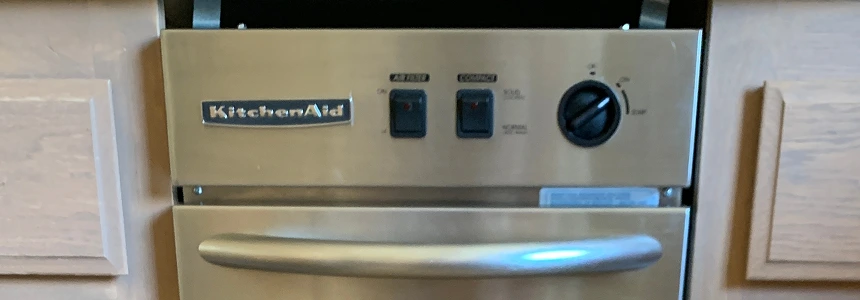





picture of trash compactor
Liberty Home Guard

Expert-Reviewed Content: Guided by Editorial Standards

Angel Vallejo

Written By Angel Vallejo

Published 05/21/26
Home Maintenance

Trash Compactor Repair: Troubleshooting, Fixes, and Costs

Key Takeaways:

  • Safety and diagnosis come before everything else. Always unplug the unit or cut the breaker before touching anything internal. From there, most problems trace back to a small set of usual suspects: a drawer that isn't fully latched, a worn switch, a stretched chain, or a lack of lubrication. Starting with the simplest checks saves time and prevents unnecessary part replacements.
  • Know where the DIY line is. Sticky drawers, noisy chains, and faulty limit switches are reasonable homeowner repairs. Anything involving the motor, gearbox, repeated breaker trips, or burned wiring crosses into professional territory. Recognizing that line early saves both money and safety risk.
  • Prevention beats repair. Regular wipe-downs, proper compactor-rated bags, dry lubrication of tracks and rollers, and never compacting prohibited items (aerosols, flammables) will head off the majority of common failures before they start. And when something does go wrong, optional coverage through Liberty Home Guard can mean a technician at your door within 24 to 48 hours, with a 365-day workmanship guarantee backing the repair.

Your trash compactor has one job. One. And yet here you are, staring at a machine that refuses to compact, sounds like a haunted carnival ride, or has frozen in place with the ram stuck halfway down like it gave up on life mid-cycle.

The good news: many of the most common trash compactor problems are surprisingly fixable. This guide walks you through a prioritized troubleshooting flow, step-by-step DIY fixes, when to wave the white flag and call a pro, and how a home warranty through Liberty Home Guard can take the sting out of repair bills. Before we get into any of that, though, there is one non-negotiable we need to cover.
Submit a Claim

Don’t let breakdowns pile up.

Keep your compactor crushing it with
reliable coverage.

Explore Trash Compactor Coverage

Safety First: Read This Before You Troubleshoot

Trash compactors are deceptively powerful machines. OSHA tracks compactor-related workplace incidents in its federal safety database, and the lesson from that record is simple: compactors deserve respect. Here is what to do before you touch anything:

Safety rules, no exceptions:

  • Unplug the unit from the wall outlet, or flip the dedicated circuit breaker, before removing any panels or reaching inside.
  • Never put your hands into a compactor while it is plugged in or mid-cycle.
  • Wear cut-resistant gloves and eye protection. Broken glass, sharp metal edges, and compressed debris are all real hazards inside a compactor bin.
  • If you smell burning, see smoke, or spot any scorched or melted wiring, stop immediately. This is a job for a licensed technician, not a screwdriver and some optimism.

With that sorted, let’s talk about how this machine actually works.

How a Residential Trash Compactor Works (Fast Primer)

Understanding what is a trash compactor helps you diagnose it faster. At its core, a residential under-counter trash compactor is elegantly simple: a motor drives a ram (or plate) downward to crush garbage, then pulls it back up, all in a single cycle.

The main components you will encounter:

  • Motor and gearbox: The engine room. The motor powers everything; the gearbox translates that power into the ram’s movement.
  • Drive chain or belt and power nuts: These transfer motion from the gearbox to the ram itself. Worn power nuts and a stretched or broken chain are among the most common failure points.
  • Limit switches and directional switches: These small but critical switches tell the ram when to stop going down and when to reverse back up. A faulty limit switch is behind a surprising number of compactor misbehaviors.
  • Start switch or foot pedal: How you initiate a cycle. Misalignment here is an easy thing to overlook.
  • Drawer, latch, rollers, and tracks: The mechanical front end of the unit. If the drawer does not close and latch fully, most compactors will not start at all, by design.

Components typically fail through normal wear, debris accumulation, misalignment, or simply a switch that has given up. Now let’s figure out which one is causing your problem.

Quick Diagnostic Flow: Start Here

Scan this list for your symptom, then jump to the relevant fix section below.

Compactor Won’t Start

  • Check that the unit is actually plugged in and the circuit breaker has not tripped.
  • Confirm the drawer is fully closed and the latch is engaged. This is the single most overlooked cause of a no-start condition.
  • Test the start switch or inspect the foot pedal for alignment issues.
  • With power off, look for any obviously damaged visible wiring. If you find any, that is a job for a pro.

Compactor Runs but Doesn’t Compact

  • Listen carefully: is the motor running? If yes, the problem is likely mechanical rather than electrical.
  • Inspect the drive chain or belt for slack, breaks, or slipping.
  • Look for stripped or cracked plastic gears, and check for worn power nuts.

Ram Stuck Down or Up

  • Inspect the drive chain or gears for damage.
  • Check the top limit switch or directional switch for proper alignment and visible damage.
  • This one can turn into an advanced repair quickly. If you are not comfortable with electrical testing, call a technician.

Loud Noises (Banging, Squealing, Grinding)

  • Inspect the drive gear teeth and motor gear for wear or breakage.
  • Check chain tension: too loose and it will bang around.
  • Assess lubrication. Many compactors develop noise problems simply because key moving parts have run dry.

Keeps Running Past the End of a Cycle

  • The top limit switch or directional switch is the primary suspect.
  • A mechanically stuck start switch can also cause continuous running.

Drawer Won’t Open or Won’t Stay Closed

  • Lift the drawer slightly and inspect the rollers and tracks for debris, damage, or misalignment.
  • Check foot pedal screws for looseness.
  • Inspect the catch and latch alignment; lubricate the tracks with a dry lubricant.

Odors or Leaks

  • Wipe down the ram plate and bin interior thoroughly.
  • Use only compactor-rated bags, which are built to contain leaks far better than standard trash bags.
  • Clean any spill residue promptly before it hardens into something that requires a chisel.
  • Use baking soda or a manufacturer-recommended deodorizer; do not spray liquid cleaners into mechanical components.

Step-by-Step Fixes for the Most Common Problems

Note on costs: For repair cost estimates, we recommend checking LHG’s average appliance repair costs guide rather than working from generic internet numbers, which vary wildly and are frequently outdated. Always consult your owner’s manual for model-specific steps.

Fix 1: Compactor Won’t Start

Tools you need: Multimeter, screwdriver set, flashlight

Difficulty: Easy to moderate

Time to complete: 20 to 45 minutes

  1. With the unit unplugged, inspect the power cord and outlet. Plug a different device into the same outlet to confirm power is reaching it.
  2. Reset the circuit breaker if it has tripped. If it trips again immediately after you run the compactor, stop and call a pro. Repeated trips indicate an electrical fault.
  3. Open and close the drawer firmly. Press and hold to ensure the latch fully engages. Even a millimeter of misalignment can prevent the safety interlock from activating.
  4. Inspect the foot pedal or start switch. Look for obvious misalignment, physical damage, or debris blocking movement.
  5. With power off and using a multimeter set to continuity mode, test the start switch. No continuity when activated means the switch needs replacement.
  6. If all of the above check out and the unit still will not start, the issue is likely the motor or a deeper wiring fault. This is the point to contact a qualified technician.

Safety note: Any time you are testing electrical components with a multimeter, confirm twice that power is disconnected at the breaker before opening panels.

Submit a Claim

Stay connected without getting burned.

Protection for the wiring that powers
your entire home.

Explore Electrical Coverage

Fix 2: Banging, Squealing, or Grinding Noises

Tools you need: Screwdriver set, socket set, flashlight, dry lubricant, owner’s manual

Difficulty: Moderate

Time to complete: 30 to 60 minutes

  1. Unplug the unit and remove the lower access panel per your owner’s manual.
  2. Inspect the drive gear teeth and motor gear for chips, cracks, or missing teeth. Plastic gears are common in residential compactors and they do wear out.
  3. Check the drive chain tension. A loose chain will slap and bang. Your owner’s manual will specify the correct tension.
  4. Apply dry lubricant (not WD-40, which attracts dirt) to the chain and any specified lubrication points in the manual.
  5. Reassemble and run a test cycle, listening carefully to locate whether the noise persists and from which area.
  6. If the noise continues after lubrication, a gear or chain replacement is likely needed. Replacement parts for common brands such as Whirlpool, GE, and KitchenAid are generally available, though availability varies by model age.

Fix 3: Ram Stuck Down or Up

Tools you need: Screwdriver set, flashlight, multimeter, owner’s manual

Difficulty: Moderate to advanced

Time to complete: 45 to 90 minutes

  1. Confirm power is off at the breaker before accessing any internal components.
  2. Access the bottom panel (if ram is stuck down) or top panel (if ram is stuck up) per your manual.
  3. Visually inspect the drive chain and gears for obvious breakage or jumping off the sprocket.
  4. Locate the directional switch or top limit switch. Check its physical alignment and look for visible damage.
  5. Using a multimeter, test the switch for proper continuity in each position. A switch that tests as failed in any position should be replaced.
  6. Inspect and lubricate the power nuts (the threaded components the ram rod passes through). Worn power nuts are a frequent cause of a ram that will not travel its full range.
  7. If the chain, gears, or power nuts are the problem and you are comfortable with the repair, replacement parts are typically available. If electrical diagnosis is involved, consider bringing in a pro.

Fix 4: Compactor Keeps Running After the Cycle

Tools you need: Multimeter, screwdriver set, flashlight

Difficulty: Moderate

Time to complete: 30 to 45 minutes

  1. Unplug the unit.
  2. Locate the top limit switch or directional switch. This component signals the unit to stop and reverse at the top of the ram’s travel. When it fails, the motor keeps running.
  3. Test the switch with a multimeter. No continuity (or constant continuity) when it should toggle indicates failure.
  4. Inspect the start switch for any sign of mechanical sticking. A physically stuck start switch can keep the circuit live.
  5. Replace the failed switch. These are often inexpensive parts, though accessing them varies by model.

Fix 5: Drawer Won’t Open or Close Smoothly

Tools you need: Screwdriver set, flashlight, food-safe degreaser, dry lubricant

Difficulty: Easy

Time to complete: 15 to 30 minutes

  1. Fully open the drawer and lift it slightly to inspect the rollers on each side.
  2. Clean the roller tracks with a food-safe degreaser and a brush or cloth. Hardened debris and grease buildup are the most common culprits.
  3. Apply a thin layer of dry lubricant to the tracks and roller contact points.
  4. Check the foot pedal screws for looseness and tighten as needed.
  5. Inspect the drawer catch and latch alignment. A drawer that will not stay closed often just needs the catch adjusted slightly.
  6. Reinstall and test. The drawer should slide smoothly and latch with a satisfying click.

When to Call a Professional

Some repairs are simply beyond the reasonable scope of DIY, and there is no shame in recognizing that. Call a pro when you are dealing with:

  • Electrical faults beyond switch testing, including motor failure, damaged wiring, or a tripping breaker
  • Motor or gearbox replacement
  • Any situation involving burning smells or scorched components
  • Recurring issues that return shortly after a DIY fix

A qualified technician will bring the right diagnostic tools, access to genuine replacement parts, and the experience to spot secondary issues you might miss. When selecting someone, it pays to know how to choose a contractor for home repairs so you are not just calling whoever appears first in a search.

When you have Liberty Home Guard coverage: Submit a claim anytime, 24 hours a day, 7 days a week. After the service fee is paid online, LHG typically dispatches a technician within 24 to 48 hours. Every covered repair comes with a 365-day workmanship guarantee, which means if the same covered issue comes back within a year, you are not starting over from scratch.

Repair vs Replace: How to Decide

Trash compactors are not the most frequently replaced appliance in a kitchen, but there comes a point where repair costs outpace replacement value. Consider replacing rather than repairing when:

  • The motor and gearbox have both failed, since these are the two most expensive components
  • Parts for your model are no longer readily available
  • You have had multiple unrelated failures in a short span of time
  • The drawer, tracks, or cabinet fit are significantly compromised

For a single failed switch or a worn chain, repair almost always makes financial sense. For compounding major component failures, it usually does not. Brush up on budgeting for home repairs if you want a framework for making this call across your whole home, not just the compactor.

Avoid hard rules about appliance lifespan without checking manufacturer documentation for your specific unit. Model-to-model variation is real, and part availability varies just as widely.

Preventive Maintenance to Avoid Repeat Repairs

A little attention on a regular schedule keeps most compactor problems from developing in the first place.

Monthly:

  • Wipe down the ram plate and the inside of the bin after emptying.
  • Clean any spill residue before it hardens. Hardened debris is one of the leading causes of ram and drawer damage.

Every few months:

  • Inspect drawer rollers and tracks; clean and apply dry lubricant sparingly.
  • Confirm the latch and foot pedal are properly aligned.
  • Check that the bag is seated correctly. A bag that slips during a cycle can jam the ram or leave residue on the mechanism.

Always and forever:

  • Use only compactor-rated bags. They are thicker, wider, and designed to handle the compression forces that will shred a standard trash bag.
  • Never compact aerosol cans, pressurized containers, flammable materials, or anything your owner’s manual lists as prohibited. Beyond the mechanical damage, this is a genuine safety issue.
  • Control odors with baking soda packets or a manufacturer-recommended deodorizer. Properly maintained compactors actually reduce overall kitchen odor by containing waste more effectively. As NYCHA’s capital projects documentation on interior compactor systems notes, well-maintained compactors improve garbage collection efficiency and support better waste separation, principles that apply at the residential scale too.

Warranty Coverage: How Liberty Home Guard Helps

Trash compactors are eligible for optional add-on coverage through Liberty Home Guard’s trash compactor home warranty program. Terms, caps, and exclusions apply, so reviewing the optional coverage page and sample agreement before purchasing is always a good idea.

Here is how it works in practice: submit a claim online at any hour, pay the service fee, and LHG dispatches a qualified technician to your home, typically within 24 to 48 hours. The 365-day workmanship guarantee covers all LHG-completed repairs, meaning a repeat failure on the same covered issue within a year will not cost you a second service fee.

LHG coverage is available across all 50 states plus Washington, D.C., and the company consistently earns strong customer ratings and industry recognition for service quality. Coverage may not apply to pre-existing conditions or components outside the plan terms, so review your sample agreement for complete details.

For a broader picture of how home warranty protection works, the home repair insurance explainer is worth a read.

The Best Home Warranty Service

There’s a reason Liberty Home Guard was rated the #1 Home Warranty Service by U.S. News and World Report for 2021, 2022, 2023, and 2024. Check out our services.

Learn More

Frequently Asked Questions

  • Why won't my trash compactor start?

    Start with the basics: confirm the unit is plugged in, the breaker has not tripped, and the drawer is fully closed with the latch engaged. A partially open drawer will prevent a start by design. If those check out, inspect the start switch or foot pedal alignment. If the unit is still dead after all of that, motor or wiring diagnosis by a professional is the next step.

  • Why is my trash compactor stuck in the down position?

    The most likely culprits are a broken drive chain or gear, or a stuck top limit or directional switch. With power off, inspect the chain tension and switch alignment. Electrical continuity testing of the switch is the diagnostic step that will confirm or rule out the switch as the cause. Anything beyond basic inspection should be handled by a pro.

  • Why does my trash compactor keep running after the cycle ends?

    A failing top limit switch or directional switch is the primary cause of a compactor that runs past its endpoint. A mechanically stuck start switch can also cause this. Power the unit off, test and replace the relevant switch, and if you are not confident doing electrical testing, have a technician take a look.

  • How do I stop loud banging or squealing noises?

    Inspect and lubricate the drive chain and gears. Replace plastic gear teeth that are worn, chipped, or broken. Confirm the chain tension is within spec per your manual, and verify the drawer is correctly aligned on its tracks.

  • Is it worth repairing a trash compactor, or should I replace it?

    For a single failed switch or a worn part, repair is almost always the better value. If the motor and gearbox have both failed, or if you are dealing with several compounding issues at once, replacement often makes more financial sense. Part availability for older models is also a practical factor worth checking before committing to a repair.

  • Can I use regular trash bags in my compactor?

    Compactor-rated bags are strongly recommended. They are built to handle the pressure and compression forces involved, and they fit the bin correctly to prevent leaks. Using a standard bag often results in tears, leaks, and debris that jams the mechanism. Check your owner's manual for the bag specifications your unit requires.

  • What items should never go into a trash compactor?

    Aerosol cans, pressurized containers, flammable or explosive materials, and anything your owner's manual specifically prohibits. When you are not sure about something, leave it out. The mechanical and safety risks of compacting the wrong item are not worth it.

  • Does a home warranty cover trash compactor repairs?

    With Liberty Home Guard, trash compactors may be covered as an optional add-on to your home warranty plan. Coverage terms, caps, and exclusions vary, so reviewing the trash compactor home warranty page and sample agreement will give you the clearest picture of what is and is not included.

Liberty Home Guard
Need help?

Talk to our Liberty Home Guard Agents 24/7.

(855) 953-9695(855) 953-9695
Liberty Home Guard
Special Offer
GET QUOTE
Liberty Home Guard
Need help?

Talk to our Liberty Home Guard Agents 24/7.

(855) 953-9695