



AC Fan Not Spinning
Liberty Home Guard

Expert-Reviewed Content: Guided by Editorial Standards

Angel Vallejo

Written By Angel Vallejo

Published 11/04/26
Home Maintenance

AC Fan Not Spinning: Common Causes and Fixes

Key Takeaways:

  • The fan in an AC system’s outdoor unit simultaneously cools the condenser coils and compressor with fresh air and blows the heat extracted from the home into the open air outside.
  • In facilitating the removal of heat from the home, the fan plays an essential role in making your home feel cooler.
  • Running the air conditioning while the fan is inoperable puts the compressor at risk of overheating. The compressor is the most expensive component in the AC, so make sure the system is off as soon as you notice that the fan isn’t working.
  • The most common cause of a faulty outdoor fan is a failed capacitor. Other possible causes include a damaged contactor, worn-out motor, electrical issue, and physical obstruction from outdoor debris.

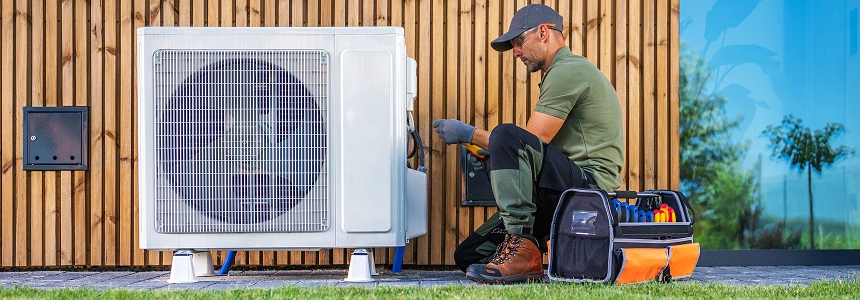
Air conditioning systems have multiple component parts, and if any one breaks down, the entire system can go down with it. If your AC system appears to be running but the air from the vents feels warm, an inoperable fan in the outdoor condenser is the probable cause. An AC fan not spinning is a common problem, but the fix is often simple and inexpensive.
Submit a Claim

Chill out—we’ve got your cooling covered.

Protection that keeps your home comfortable
when temperatures soar.

Explore AC Coverage

What the Outdoor AC Fan Does and Why the Whole System Depends on It

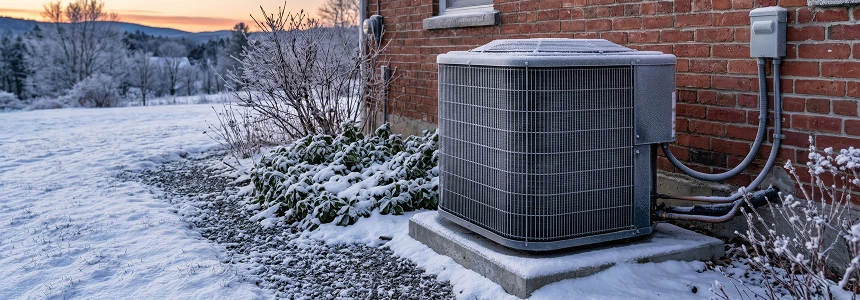
You can think of an air conditioning system as having two halves. There’s an indoor unit that absorbs heat from inside your home, and there’s an outdoor condenser that releases the absorbed heat outside. This heat transfer is made possible by refrigerant that cycles through a closed loop, but it needs a little assistance. After the refrigerant absorbs heat and travels to the condenser, it’s cooled by a fan on top of the condenser. The cooled refrigerant flows back to the indoor unit, where it can again take on some of the heat from the air inside.

The condenser fan is one of the most essential components of an air conditioning system. If that fan breaks down, the entire system can fail very quickly. First the temperature and pressure within the unit climb because the refrigerant is unable to release its heat. This puts stress on the compressor. When the compressor runs too hot, it will either burn out or trigger a safety switch, shutting down the unit. If the indoor blower fan continues to run, the air from the vents will be warm.

The Most Common Reasons an AC Fan Stops Spinning

  • A failed AC capacitor. A capacitor stores an electrical charge to jumpstart the fan motor. Capacitors wear out over time, especially with prolonged heat exposure. If the outdoor unit is humming but the fan remains motionless, it’s likely that the capacitor needs to be replaced. A bad capacitor is the most common cause of a fan malfunction.
  • A bad contactor. The AC contactor is a switch that delivers power to the compressor and outdoor fan when the thermostat signals the start of a cooling cycle. This switch can degrade over time and may get stuck. If the contactor is stuck in the open position, the compressor and fan cannot receive power.
  • A damaged fan motor. The motor that powers the outdoor fan may suffer worn bearings or windings after years of wear and tear. You might notice grinding noises or the smell of something burning. Eventually, the fan itself will no longer spin.
  • Power issues. An interruption in power will of course prevent the fan from operating. Lost power may be due to a tripped breaker, broken connection, dead thermostat batteries, or damaged wiring.
  • Physical obstructions. A twig or bunch of leaves can jam the fan blades and stop the fan from rotating. The debris usually needs to be small enough to slip into the condenser’s housing.

How to Diagnose the Problem Before Calling Anyone

When you encounter an equipment malfunction at home, it’s always worth doing some light troubleshooting on your own before calling a technician. If your AC system goes offline, follow these steps to narrow down the underlying cause.

  • Inspect the thermostat to confirm the cooling is turned on. If the digital display is faint or blank, replace the batteries.
  • Confirm that the AC system is drawing power. If necessary, reset the breaker at the main electrical panel.
  • Place your hand over the vents throughout your home to see if air is flowing through the ducts and whether it is cool. Examine the indoor equipment for obvious signs of trouble, such as a refrigerant or water leak.
  • Check the outdoor unit for any problems as well. If the fan is visible through the housing, see if there are any physical obstructions. Listen for shrill noises or the sound of grinding metal, which might suggest the need for fan motor replacement.
  • Stand outside by the condenser to see if it comes online when the system is set to cool. If the condenser is humming but the fan is still, there is probably a bad capacitor or worn-out motor. If both the condenser and fan are quiet, there is an upstream power issue, which could be a bad contactor, bad wiring or connections, dead thermostat, or tripped breaker.

What You Can Fix Yourself vs. What Needs a Technician

Some basic AC troubleshooting is perfectly safe, but any actual repairs to damaged equipment is best left to the professionals. The risk of electrocution is real for someone unfamiliar with the necessary safety precautions. Handling refrigerant is also hazardous, and the EPA requires that a certified professional performs any repairs or servicing that involves refrigerant.

Here are the tasks that a safe to perform on your own:

  • Check and adjust the thermostat settings and replace the batteries.
  • Restore power to a circuit by resetting a tripped breaker.
  • Keep the outdoor unit free of sticks, leaves, and other outdoor debris.
  • Carefully clean the condenser coils with a damp cloth or gentle spray from a hose.

Here’s what you should leave to an HVAC professional:

  • Replacing the capacitor. It’s possible for a capacitor to retain an electrical charge even after the main power source is disconnected.
  • Repairing the contactor, wiring, or connections. The electrical components in an AC system use high-voltage power and need to be serviced by a licensed professional.
  • Replacing the fan motor. A new motor isn’t necessarily plug-and-play. Its speed, rotation, and power need to be properly calibrated.
  • Recharging the refrigerant or fixing a leak. Refrigerants are highly regulated, and the layperson can’t simply top off the refrigerant in a cooling system. The EPA requires official certification for any repairs involving refrigerants, and the system needs to be purged properly so that it is airtight and pressurized.

How Much It Costs to Repair or Replace an AC Fan

The cost to repair an AC fan is dependent on the underlying cause of the problem, your unit’s model and manufacturer, and your local cost of living.

One portion of the overall cost is the service fee and labor. Service fees range from $75 to $200, and HVAC labor costs are around $75 to $150 per hour. A quick and easy fix, like swapping out a capacitor, won’t cost you very much. Repairing leaks or recharging refrigerant might take more time, inflating the cost.

The other portion of the total expense is the cost of new parts. A capacitor or contactor is often under $50. Outdoor fan motors are a little pricier and often cost between $100 and $300. Compressors are expensive, starting in the high hundreds and easily exceeding $1,500.

If you’re in an area with a low cost of living, and the underlying cause is a cheap part, repairing your outdoor AC fan might set you back a couple hundred dollars. If you have premium equipment, live in an expensive area, and need to replace the motor or compressor, you should prepare to spend $1,000 or more.

How to Repair Your AC System Affordably

Appliance malfunctions have a habit of catching us off guard, and we’re not always prepared to pay for the repair costs. Warranty coverage solves that problem by keeping your home expenses predictable and covering repair costs when a problem arises so that you don’t have to pay out of pocket. Learn how Liberty Home Guard’s award-winning coverage can protect your home’s AC system by calling (833)-543-7699.

Protect What’s Most Important With
America’s #1 Home Warranty

Get A Free Quote
  • Comprehensive Plans
  • Highly Competitive Rates
  • 24/7/365 Claims
  • Online Portal

Frequently Asked Questions

  • How long can an AC run before the compressor overheats?

    There are too many variables to give a single answer, but if the condenser fan shuts down on a hot day, the compressor’s safety switch may turn off the system within just a few minutes. 

  • Is it safe to run AC when the fan stops?

    No, it’s not a good idea to continue running the AC if the outdoor fan is not working. The compressor can quickly overheat and turn a cheap repair into a very expensive one. If you still want air circulation, you can switch the indoor blower fan from “auto” to “on” at the thermostat.

  • How long do AC fan motors typically last

    An AC fan motor should easily last 10 to 15 years or more. The lifespan is dependent on quality of maintenance and overall usage.

  • How do I know if my AC capacitor needs replacing?

    If you don’t have a digital multimeter, you can check for symptoms such as short-cycling, buzzing from the condenser, no fan rotation, and bulging or corrosion on the capacitor itself. These are signs that the capacitor needs to be replaced.

  • Will homeowner’s insurance cover a broken AC fan?

    No, homeowner’s insurance doesn’t usually cover equipment repairs unless it’s damaged in a storm, fire, or other disaster. Appliance and system repair is more the domain of home warranty coverage.

Liberty Home Guard
Need help?

Talk to our Liberty Home Guard Agents 24/7.

(855) 953-9695
Liberty Home Guard
Special Offer
GET QUOTE
Liberty Home Guard
Need help?

Talk to our Liberty Home Guard Agents 24/7.

(855) 953-9695